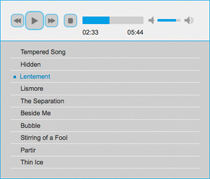
The cool thing is that it offers full control of it for JQuery programmers. You can set seek media, set volume, change video/audio, load playlist, and do a hell of things that most of the paid/expensive media players do such as Longtail's JW Player. Its Javascript based so most of the frontend developers would love it.

Monday, May 16, 2011
jPlayer: An HTML5 and JQuery based audio video player
The cool thing is that it offers full control of it for JQuery programmers. You can set seek media, set volume, change video/audio, load playlist, and do a hell of things that most of the paid/expensive media players do such as Longtail's JW Player. Its Javascript based so most of the frontend developers would love it.

Tuesday, January 18, 2011
How to send HTML email using Microsoft Outlook or Windows Live Mail
As you may know, Windows Live Mail supports including HTML signatures and we can import external html files as well. This is what I incorporated.
Please follow the steps below:
Step 1: Compose the email
Compose the email in html. Read more information and guidelines on composing html emails here.
- Create new html file and compose it according to your requirements
- Save it as an html file on your computer (emailtemplate.html in our case)
This is how our email looks in design view. I used few <p>, <strong> , <img> and <table> tags for instance.
Step 2: Create new Signature
In your Windows Live Mail(Or Outlook)
- Go to Tools > Options
- Go to Signatures tab
- Press New Button
- Select File
- And browse the HTML file that you just created.
Step 3: Insert in your email
- Compose new email
- From Signatures drop down
- Select the latest signature that you just created (HTML Email in our case)
Feel free to comment if you need more help!
Monday, October 11, 2010
Microsoft Launches Demo HTML5 website
See it here: beautyoftheweb.com
Not sure when HTML5 is going to be a common practice in web design industry.
Monday, September 13, 2010
How to make a fast flying DNN site
There are two major factors:
Dead sites
Yes, your site dies or sleeps if its not opened by a user for a certain time(in minutes of most of the servers). The IIS shuts down the process and cleans the memory in that case resulting a very long time on next first hit.
Rendering Time
The loading time of a page depends on the rendering time, design level things like CSS, image optimization, Cache settings, compression settings etc. Also, disabling the features that you don't need in a site will reduce the burden.
1. Skin should be fully CSS based
2. Use some other menu provider (Native navigations i.e; Nav, Solpart etc are slower)
3. It also depends what modules you're using in your site. Text/HTML is the fastest module.
4. For every new dnn project, we always optimize it according to Mitchel's most useful post in his blog: http://www.mitchelsellers.com/blogs/articletype/articleview/articleid/283/how-i-get-my-dotnetnuke-sites-to-run-so-fast.aspx
5. Also, there's a very good document about this topic found here DotNetNuke Performance Configuration Best Practices by Mitchel Sellers
6. Never let your application sleep.
I hope this helps!
Friday, September 3, 2010
Keep a DNN website alive for FREE
I remember the times when we used to use the desktop utilities like Renegade Mind's keep alive utility for DNN but the major drawback of it was, if the computer where its installed shuts down or goes out of internet connectivity then your site is gone again :S
I hope the service will remain free forever :p
Tuesday, September 11, 2007
ASP.net Tab Missing IIS Manager
aren't fully uninstalled before the release version is installed, or when
Visual Studio's components are uninstalled in the wrong order.
Solution
FDBK21319#2: Remove Registry Entries that cause the problem
Thanks to Chris Adams:
http://www.eggheadcafe.com/forums/F...D=20592&INTID=6
To fix, check the following 3 regkeys :
HKEY_CLASSES_ROOT\CLSID\{7D23CCC6-A390-406E-AB67-2F8B7558F6F6}\InprocServer*32
HKEY_CLASSES_ROOT\CLSID\{FD5CD8B1-6FE0-44F3-BBFB-65E3655B096E} \InprocServer32
HKEY_CLASSES_ROOT\CLSID\{FEDB2179-2335-48F0-AA28-5CDA35A2B36D}\InprocServer*32
Under (expand) InProcServer32, look for the presence of a non-2.0.0.0 (example 2.0.36.0)
and remove it. It has a reference that causes this to break.
WARNING : don't fool with the registry if you are not proficient doing that.
Option B
You can work around the problem, if editing the registry doesn't fix it, by using
Denis Bauer's ASP.NET Version Switcher to switch ASP.NET versions.
http://www.denisbauer.com/NETTools/...onSwitcher.aspx
While it doesn't edit ASP.NET configuration files, at least it allows you
to pick the version of the framework will be used for specific websites.
Here's instructions on how to manually uninstall beta versions of Visual Studio 2005
http://msdn.microsoft.com/vstudio/s...ll/default.aspx
Or, you might want to use the VS 2005 beta cleanup tool.
http://go.microsoft.com/fwlink/?LinkId=47598
Source: http://www.thescripts.com/forum/thread559064.html
Thursday, June 21, 2007
Adding UNICODE data (Urdu/Arabic or RTL data) into Database
Problem:
Adding unicode data to the database produces weird question marks '????? ???? ??????' on output or displaying data.Solution:
We can very easily correct this from the query analyzer using the "N" prefix, which instructs SQL server to treat this data as unicode. For example, the following code works perfectly.sample query
update tblUrduArticles
set UrduDesc = N'بول کہ لب آزاد ھیں تیرے'
where ArticleID = 1296
I've checked it sql server 2000 successfully, hopefully it will work for you as well.
Regards
Imran Saami
Wednesday, June 20, 2007
Changing Ownership of Database objects
change ownership of a single object
EXEC sp_changeobjectowner 'authors', 'Muhammed'
Bulk Table Change Owner:
This will change the ownership of all tables found under a specified owner
DECLARE @oldOwner sysname, @newOwner sysname, @sql varchar(1000)
SELECT@oldOwner = 'aspalliance'
, @newOwner = 'dbo'
, @sql = 'IF EXISTS (SELECT NULL FROM INFORMATION_SCHEMA.TABLES
WHERE
QUOTENAME(TABLE_SCHEMA)+''.''+QUOTENAME(TABLE_NAME) = ''?''
AND TABLE_SCHEMA = ''' + @oldOwner + '''
)EXECUTE sp_changeobjectowner ''?'', ''' + @newOwner + ''''
EXECUTE sp_MSforeachtable @sql
Bulk Stored Procedure Change Owner
Since there's no direct iteration method for stored procedures so the code below will produce the queries for each stored procedure, copy the produced text and run it in query analyzer.
DECLARE @oldOwner sysname, @newOwner sysname
SELECT @oldOwner = 'aspalliance' , @newOwner = 'dbo'
select 'EXECUTE sp_changeobjectowner '''+QUOTENAME(a.SPECIFIC_SCHEMA)+'.'+QUOTENAME(a.ROUTINE_NAME)+''','''+@newOwner+''''
from
INFORMATION_SCHEMA.ROUTINES a
where
a.ROUTINE_TYPE = 'PROCEDURE'
AND a.SPECIFIC_SCHEMA = @oldOwner
AND
OBJECTPROPERTY(OBJECT_ID(QUOTENAME(a.SPECIFIC_SCHEMA)+'.'+QUOTENAME(a.ROUTINE_NAME)), 'IsMSShipped') = 0
Tuesday, June 19, 2007
EXECUTE permission denied on object 'aspnet_CheckSchemaVersion'
Exception Details:
System.Data.SqlClient.SqlException: EXECUTE permission denied on object 'aspnet_CheckSchemaVersion', database 'g4ity_dbase4ity', owner 'dbo'.
OR ANY kind of Execute Permission Denied on sql Server object.Solution
- Goto properties of the dbo.aspnet_StoredProcedureName
- Open Permissions
- Allow your username for exec Permission
Overview
Whilst SQL Server 2000 has fixed database roles such as db_datareader and db_datawriter that allow a user read or write access respectively to all the table is a database, no such role exists for the execution of stored procedures (a db_executor role if you will). This article describes how to grant execute permission to all stored procedures in a database to a specific user or role in both SQL2000 and SQL2005
SQL2000
A common answer to the question posed by the title of this article is to run a query such as the one below in Query Analyzer and copy and paste the results into a query window and execute them. The query uses the INFORMATION_SCHEMA views to generate a list of GRANT statements for each procedure in the database.
Do one of the following
- Goto properties of the dbo.aspnet_StoredProcedure Name Open PermissionsAnd Allow your username for exec Permission
. - To change permissions on an individual object
grant exec on [Owner].[ObjectName] TO UserName
. - Simply run in sql Query Analyzer to change permissions on all objects in a database. It will generate a resultset with GRANT permission queries for all possible objects. copy it and paste in the query window of query analyzer and run it.
SELECT 'grant exec on ' + QUOTENAME(ROUTINE_SCHEMA) + '.' +QUOTENAME(ROUTINE_NAME) + ' TO ' FROM INFORMATION_SCHEMA.ROUTINES
WHERE OBJECTPROPERTY(OBJECT_ID(ROUTINE_NAME),'IsMSShipped') = 0
. - Run this code if you want to change permissions on objects under dbo's ownership. Run this code same as mentioned in part 2 above.
SELECT 'grant exec on ' + QUOTENAME(ROUTINE_SCHEMA) + '.' +QUOTENAME(ROUTINE_NAME) + ' TO ' FROM INFORMATION_SCHEMA.ROUTINESWHERE OBJECTPROPERTY(OBJECT_ID(ROUTINE_NAME),'IsMSShipped') = 0 AND QUOTENAME(ROUTINE_SCHEMA)='[dbo]'
SQL2005
SQL Server 2005 improves on the current situation by making the EXECUTE permission grantable at the database scope. This means that we can issue a statement like the example below and this will GRANT execute permissions on all existing stored procedures and scalar functions AND all subsequently created ones. Thus it acts very much like the current fixed database roles such as db_datareader
/* CREATE A NEW ROLE */
CREATE ROLE db_executor
/* GRANT EXECUTE TO THE ROLE */
GRANT EXECUTE TO db_executor
Monday, June 18, 2007
DotNetNuke Error: URL blinks several times in status bar and doesn't browse the site :'(
PROBLEM:
The address blinks many times in the status bar and finally browser shows the 'Page Cannot be displayed' error and sometimes this blinking loop never ends.
EXPLANATION
It normally happens when you change the alias of the portal in 'portalalias' table.
SOLUTION :
- Make sure the alias in the portalalias table is correct OR
- Restart the site from IIS. If you don't have rights to do that u can just make a fake change in web.config and upload it again. The site will be restarted.
- If site is running on local host then simply kill the aspnet_wp.exe processe
- Browse the site again,
IF problem persists, then get help from your host, there must be some issues in NS servers.
Cheers